
Pokiesok registration is completed with a full name, mobile number, 6–20 character password, optional referrer code and SMS verification code. The most important instruction on the supplied form is that the full name must match the name on the player’s bank account.
For an Australian account, use your own active mobile number and legal name. During our check of the registration screen, no email field, date-of-birth field or address field was visible at this stage. Additional verification may appear later inside the account or cashier.
| Registration field | Requirement shown |
|---|---|
| Full Name | Must match the bank account name |
| Mobile No | Active mobile number |
| Password | 6–20 characters |
| Referrer Code | Optional |
| Verification Code | Sent by SMS after selecting Get Code |
| Email field | Not visible |
| Account currency | AUD after account access |
| Existing account route | Login link below the registration button |
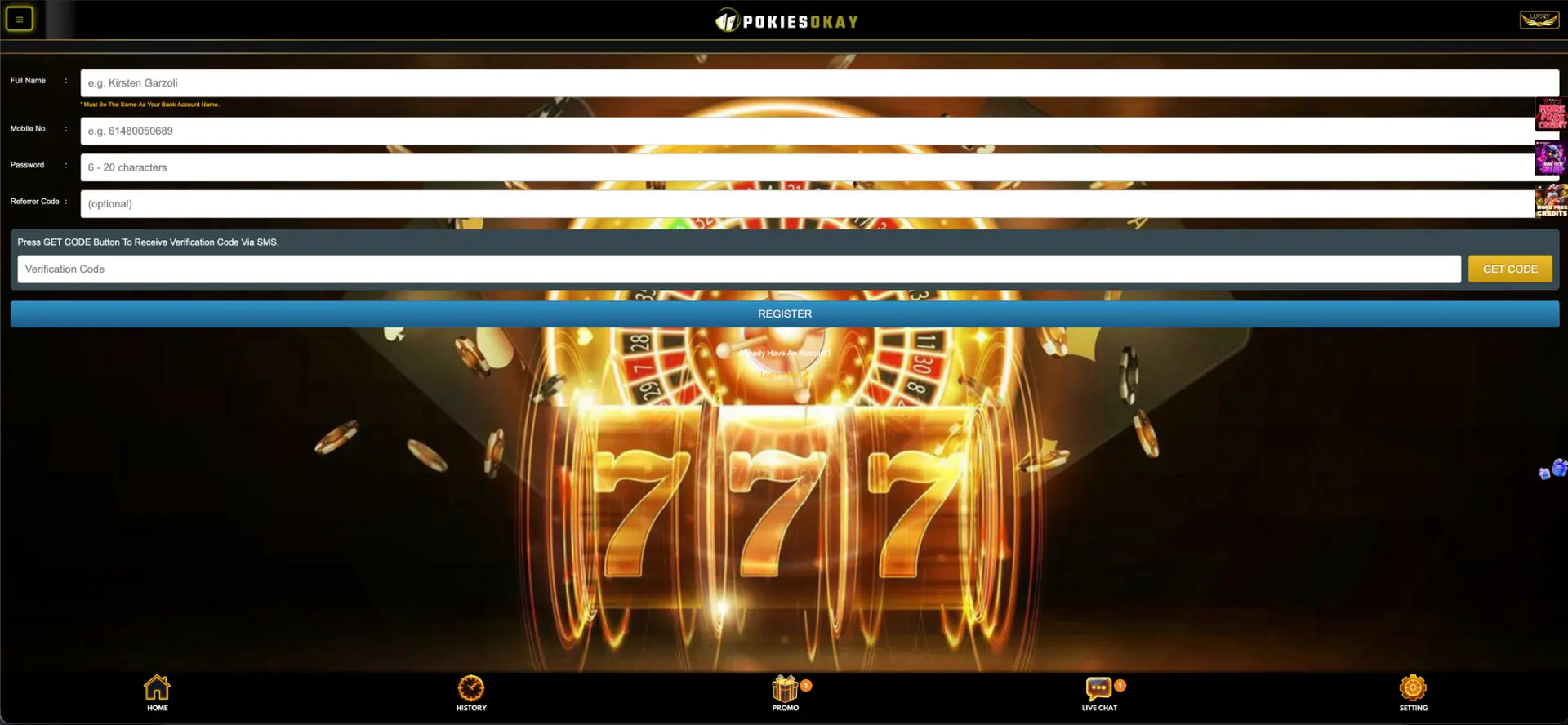
How to complete Pokiesok registration
- Open the registration page from the confirmed site.
- Enter your full legal name exactly as it appears on your bank account.
- Enter your active mobile number.
- Create a password containing 6–20 characters.
- Add a referrer code only when you have a valid one.
- Select Get Code.
- Enter the SMS verification code.
- Select Register once and wait for the account to open.
Full-name and bank-account matching
The form specifically states that the full name must be the same as the bank account name. Use the same spelling, order and spacing shown on official records. Avoid nicknames or shortened versions.
When the account has already been created with incorrect details, use Live Chat before making a deposit. Do not create multiple accounts to fix a spelling error unless support instructs you to do so.
Pokiesok SMS verification
The registration page tells the player to press Get Code to receive a verification code by SMS. This links the mobile number to the new account.
- Check the mobile number before requesting the code.
- Wait for the first message before requesting another.
- Do not share the code with another person.
- Enter it only on the registration page you opened.
- Use Live Chat when the code does not arrive after a reasonable wait.
Choosing a Pokiesok password
The displayed password range is 6–20 characters. Use a unique password rather than one already used for email, banking or social-media accounts. Include a mix of letters, numbers and symbols where accepted.
Avoid a mobile number, date of birth, footy team name or repeated pattern. A reputable password manager is safer than keeping the password in an unprotected note.
Optional Pokiesok referrer code
The Referrer Code field is marked optional. Leave it blank when you do not have a trusted code. A random code may connect the account to an unintended campaign.
Account verification after registration
No full document-check page is visible in the supplied screens. However, name matching is clearly required, and a cashier may later ask for identity, address or payment ownership evidence.
Submit documents only through the secure account area or a route confirmed by Live Chat. Never send identity files or SMS codes to an unverified Facebook, WhatsApp or Telegram account.
Common Pokiesok registration errors
SMS code does not arrive
Check the number and mobile signal, wait for the first request to finish and avoid repeated presses on Get Code.
Mobile number is already registered
Use the Login or Forgot Password route rather than opening another account.
Password is rejected
Confirm that it contains 6–20 characters and remove unsupported spaces.
Name does not match bank details
Correct the details before depositing or contact Live Chat when the account has already been created.
Registration on mobile
No native app is visible in the supplied material. Registration can be completed through a mobile browser. Use a stable connection and keep the SMS screen available without closing the registration page.
What appears after registration?
The main interface provides Home, History, Promo, Live Chat and Setting. The lobby displays Booongo, Aristova, Slot, Sport, Fast Game and Live categories, plus a search field. The visible cashier minimums are AUD 10 for deposits and AUD 50 for withdrawals.
Pokiesok registration FAQ
Do I need an email address to register?
No email field is visible in the supplied registration form.
Is a referrer code required?
No. The field is marked optional.
How long can the password be?
The form displays a range of 6–20 characters.
Why must my name match my bank account?
The registration form explicitly requires this match, which can support later payment checks.
Where do I enter the SMS code?
Enter it in the Verification Code field beside the Get Code area.
Can I log in after registering?
Yes. The login page accepts a mobile number or username plus password.